Stop Order vs Limit Order: Differences and Examples
Compare buy and sell stop orders with limit orders on one quote sequence. See when each can fill, why a stop price is not a fill price, and how stop-limit orders differ.
Before you read · terms and starting articles
New to a term? Open the trading glossary.
In this article
What is the difference between a stop and a limit order?
A limit order sets an acceptable execution price: a buy limit can fill at that price or lower, while a sell limit can fill at that price or higher. An ordinary stop order waits for a price trigger, then becomes a market order. Its eventual fill can differ from the stop price. These basic securities definitions are explained by Investor.gov's guide to order types.
In this article, stop order means stop-market. A stop-limit is a separate instruction that combines a trigger with a limit price.
| Instruction | What the specified price means | What happens after the condition is met |
|---|---|---|
| Buy limit | Maximum acceptable purchase price | Can buy at the limit or lower |
| Sell limit | Minimum acceptable sale price | Can sell at the limit or higher |
| Buy stop-market | Upward activation threshold | Releases a market buy |
| Sell stop-market | Downward activation threshold | Releases a market sell |
The order controls execution, not the quality of the trading setup. For the broader introduction, including market orders, see market, limit, and stop orders.
Buy stop vs buy limit: opposite conditions
Suppose the quote is 100.0 bid / 100.2 ask. The bid is the current buying quote; the ask is the current selling quote.
A buy limit at 99.5 expresses: “Buy only at 99.5 or less.” It could be used for a planned pullback entry. If the market rises continuously, the order can remain unfilled.
A buy stop at 101.0 expresses: “Activate a market buy when the upward trigger is met.” It could be used for a planned breakout entry or to close a short position. The 101.0 threshold is not a maximum purchase price.
Placement alone does not define a limit order. A buy limit above the available ask may be immediately executable because that ask already satisfies its maximum price. It does not wait for an upward breakout. The same distinction matters when turning a breakout candle rule into an order.
Sell stop vs sell limit: an exit trigger or a price floor
From the same 100.0 / 100.2 quote, a sell limit at 101.0 waits for an acceptable sale price of 101.0 or more. For a long position, that might implement a profit target.
A sell stop at 99.0 waits for a downward trigger, then releases a market sell. For a long position, that might implement a protective exit. It can fill below 99.0.
A sell limit placed below the current bid may instead be immediately executable at the available bid. Substituting a sell limit at 99.0 for a protective sell stop at 99.0 can therefore sell immediately, rather than wait for a decline. Check the actual order type in the ticket.
“Buy” and “sell” describe the transaction, not whether it opens or closes a position. A buy can close a short; a sell can close a long. Position effect and permissions depend on the account and provider.
Compare four orders on the same quote sequence
The following prices are constructed examples, not historical quotes or suggested trades. Consider each order independently, submitted before step 0. Assume ordinary partial fills are permitted, the orders remain active, and enough quantity is available at every displayed quote. For the stops, assume the provider uses last-traded price as the trigger and executes immediately at the displayed quote. Actual trigger and execution rules can differ.
This simplified comparison uses the displayed ask for buys and bid for sells, with no other fills between the listed steps. A resting limit order in a real market could receive a fill from incoming liquidity before the displayed opposite quote reaches its limit.
| Step | Last trade | Bid | Ask |
|---|---|---|---|
| 0 | 100.1 | 100.0 | 100.2 |
| 1 | 99.5 | 99.4 | 99.6 |
| 2 | 99.3 | 99.2 | 99.4 |
| 3 | 100.8 | 100.7 | 100.9 |
| 4 | 101.0 | 100.9 | 101.1 |
| 5 | 101.4 | 101.3 | 101.5 |
| 6 | 98.7 | 98.6 | 98.8 |
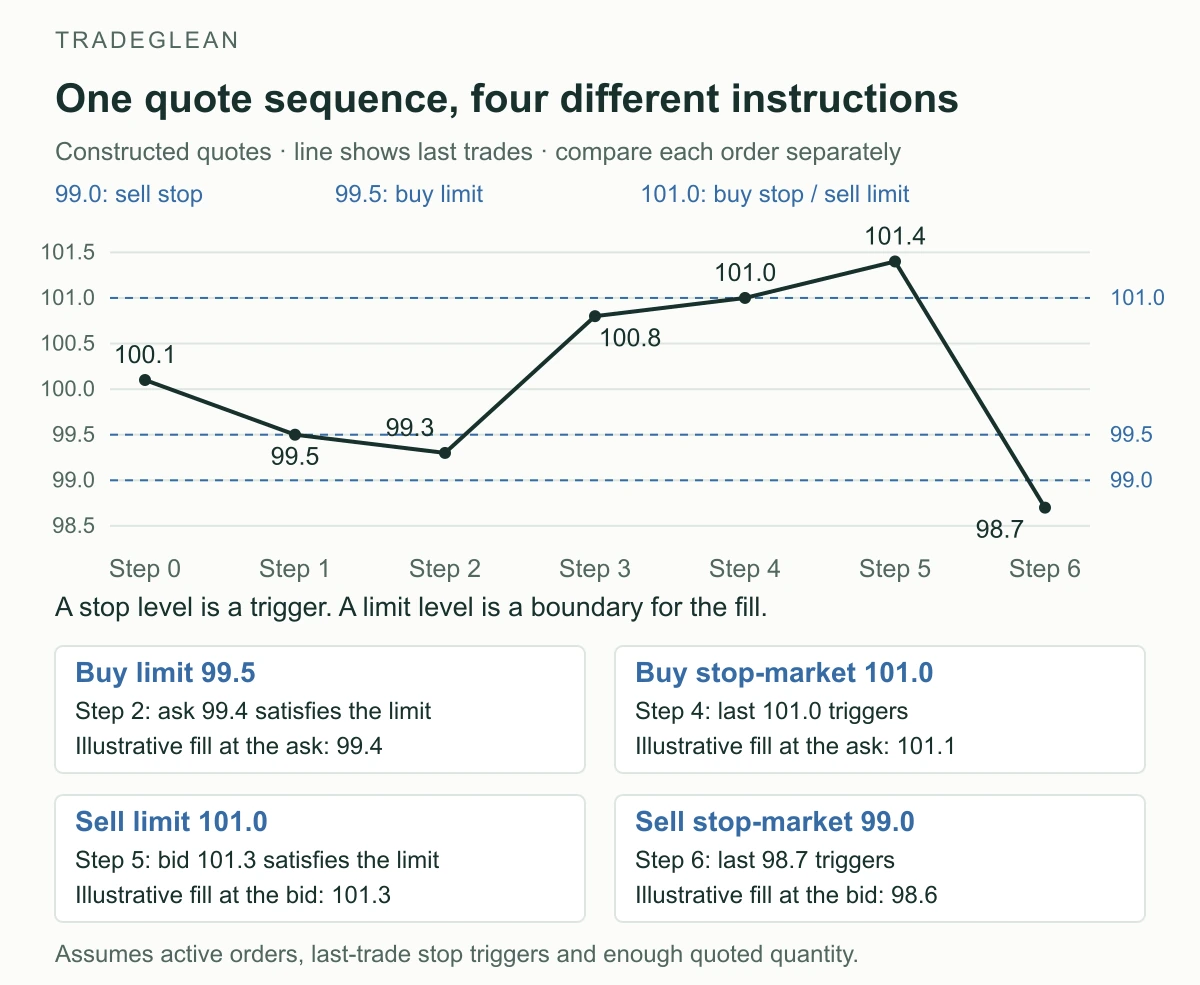
The line connects the authored last trades in order. It does not imply that every intervening price traded. The four boxes show independent comparisons, not four orders placed together.
Buy limit 99.5: At step 1, a last trade touches 99.5, but the displayed ask is still 99.6. This quote does not establish an available purchase at the limit. At step 2, the ask is 99.4, so the example fill is 99.4, a better price than the limit.
Buy stop-market 101.0: The last trade reaches 101.0 at step 4. The order activates and buys at the displayed ask of 101.1. The trigger and fill are different prices.
Sell limit 101.0: At step 4, the displayed bid is only 100.9. At step 5, the bid is 101.3, so the example fill is 101.3, above the required floor.
Sell stop-market 99.0: The first last trade at or below 99.0 is 98.7 at step 6. The order activates and sells at the displayed bid of 98.6. There was no quoted exit at 99.0 in this sequence.
An OHLC candle alone would not provide this sequence of quotes. It also would not reveal available quantity or the order's position in a queue. For the effect of bid, ask and execution differences on a trade's result, see spreads, fees, and slippage.
Stop-limit vs limit: the extra activation step
An ordinary limit order is eligible to execute when its price condition and other order conditions are satisfied. A stop-limit order first waits for a stop trigger, then releases a limit order. FINRA's order guide explains this two-stage instruction.
Apply a sell stop-limit with stop 99.0 and limit 98.9 to the same sequence. At step 6, the 98.7 last trade triggers it. However, the resulting sell limit refuses the displayed 98.6 bid because it is below the 98.9 floor. It remains unfilled at that quote. An active order could fill later if an eligible price returns; it could also expire or be canceled first.
The stop-limit preserves a price boundary at the cost of possible non-execution. It does not guarantee that a losing position will close. A buy stop-limit has the corresponding ceiling: after activation, it cannot buy above its limit.
Why neither order guarantees the planned outcome
Stops can slip or activate during a brief move. A stop-market becomes a market order after triggering, so a fast move or gap can produce a substantially different fill. A quick rebound does not reverse an executed trade. FINRA's explanation of stop orders in volatile markets describes both risks.
Limits can miss or fill only part of the quantity. A chart touch does not prove that enough eligible liquidity reached your order. In a separate constructed example, a 100-unit buy limit at 99.5 could fill 30 units at 99.4 and leave 70 waiting if only 30 are available and no other acceptable sellers appear. A fill-or-kill or all-or-none condition changes partial-fill behavior; availability differs by firm. See FINRA's order qualifiers.
Trigger settings matter. Confirm whether the provider uses a trade, bid, ask, or another specified price, which trading hours are active, and when the order expires. The example's last-trade assumption is not a universal setting. A stop also need not wait for a candle to close.
Choose the instruction by the condition it must implement: an acceptable price, a price trigger, or a trigger followed by a price boundary. Then account for the failure case in stop-loss and position sizing. A protective trigger is a planning reference; the actual fill determines the realized result.